
Welcome back to my AI Tools page! Today, I’m diving into an exciting experiment with one of the latest AI models, Claude Sonnet 3.7, developed by Anthropic. As someone who loves blending technology and creativity, I wanted to see how this new model handles a fun yet challenging coding task in p5.js—a JavaScript library perfect for visual simulations. The prompt I gave Claude 3.7 Sonnet was:
“Write a p5.js script that simulates 100 colorful balls bouncing inside a sphere. Each ball should leave behind a fading trail showing its recent path. The container sphere should rotate slowly. Make sure to implement proper collision detection so the balls stay within the sphere.”
This isn’t just a simple coding exercise—it’s a test of how well an AI can juggle multiple concepts: 3D geometry, physics-based motion, collision detection, and visual effects, all wrapped in a beginner-friendly library like p5.js. I’m thrilled to see how Claude Sonnet 3.7 tackles this, and I’ll share the results at the end of this post. But first, let’s break down why this challenge is so interesting and what we might expect.
Why This Challenge?
The task combines several layers of complexity:
-
- 100 Colorful Balls: Managing 100 objects with unique colors and positions requires efficient data handling.
-
- Bouncing Inside a Sphere: Unlike a flat canvas, a spherical boundary demands 3D collision detection, which is trickier than simple wall bounces.
-
- Fading Trails: Adding trails that fade over time means tracking each ball’s history and rendering it dynamically—great for visual flair but a test of memory management.
-
- Rotating Sphere: A slowly rotating container adds a dynamic twist, affecting how we perceive the balls’ motion and requiring coordinate transformations.
-
- Collision Detection: Keeping all 100 balls inside the sphere means calculating their interactions with a curved surface, a step up from basic rectangular bounds.
For a human coder, this would involve setting up arrays for the balls, using vectors for 3D positions and velocities, and applying some math to ensure the balls bounce realistically off the sphere’s inner surface. The fading trails might use an array of past positions with decreasing opacity, and the rotation could leverage p5.js’s 3D capabilities. But how will Claude Sonnet 3.7 approach it? Will it nail the physics? Will it optimize for performance? Let’s find out.
The Power of AI in Creative Coding
AI models like Claude Sonnet 3.7 are fascinating because they can generate code faster than most humans can type it. They’re trained on vast datasets, including code repositories, so they can theoretically produce working solutions to complex problems. For a library like p5.js, which is popular in creative coding communities, I’m curious if Claude can capture its playful spirit while handling the technical details. Will it use p5’s built-in WEBGL mode for 3D rendering? Will it implement trails with a clever trick or brute force it? These are the questions buzzing in my mind as I test this new model.
What I’m Hoping to See
Before I reveal the results, here’s what I’d love to see in an ideal script:
-
- A clean setup with an array of ball objects, each with properties like position, velocity, and color.
-
- A 3D sphere rendered in WEBGL mode, rotating smoothly using rotateX() or similar functions.
-
- Balls bouncing off the sphere’s inner surface with proper physics—maybe using vector normalization to reflect velocities.
-
- Fading trails implemented efficiently, perhaps with a small history buffer for each ball.
-
- No balls escaping the sphere, proving solid collision detection.
Of course, AI isn’t perfect. It might miss a detail, like forgetting to account for the sphere’s rotation in the collision math, or it could overcomplicate the trails. That’s part of the fun—seeing where it shines and where it stumbles.
The Results
After running my prompt through Claude Sonnet 3.7, I’m thrilled with the p5.js script it generated. Below, you can see the code that brings this vibrant simulation to life—100 colorful balls bouncing inside a slowly rotating sphere, each leaving behind a fading trail.
let balls = [];
const numBalls = 100;
const sphereRadius = 200;
let angle = 0;
let trails = [];
function setup() {
createCanvas(800, 800, WEBGL);
colorMode(HSB, 100);
// Create balls with random positions, velocities, sizes and colors
for (let i = 0; i < numBalls; i++) {
// Create random position inside the sphere
let r = random(0, sphereRadius * 0.8);
let theta = random(0, TWO_PI);
let phi = random(0, PI);
let x = r * sin(phi) * cos(theta);
let y = r * sin(phi) * sin(theta);
let z = r * cos(phi);
// Random velocity
let vel = p5.Vector.random3D();
vel.mult(random(1, 3));
// Random ball properties
let radius = random(5, 15);
let hue = random(100);
balls.push({
pos: createVector(x, y, z),
vel: vel,
radius: radius,
color: color(hue, 80, 90)
});
// Initialize empty trails array for each ball
trails.push([]);
}
}
function draw() {
background(0);
noFill();
lights();
// Rotate the entire scene
angle += 0.005;
rotateY(angle);
rotateX(angle * 0.7);
// Draw container sphere
stroke(255, 30);
strokeWeight(1);
sphere(sphereRadius);
// Update and draw balls
for (let i = 0; i < numBalls; i++) {
let ball = balls;
// Update position
ball.pos.add(ball.vel);
// Check collision with container sphere
let distanceFromCenter = ball.pos.mag();
if (distanceFromCenter + ball.radius > sphereRadius) {
// Calculate normal vector at collision point (just the normalized position)
let normal = p5.Vector.normalize(ball.pos);
// Reflect velocity
ball.vel.reflect(normal);
// Adjust position to be inside the container
let correction = sphereRadius – ball.radius;
ball.pos = p5.Vector.mult(normal, correction);
}
// Add current position to trail
trails.push(createVector(ball.pos.x, ball.pos.y, ball.pos.z));
// Limit trail length
if (trails.length > 20) {
trails.shift();
}
// Draw trail
beginShape();
noFill();
for (let j = 0; j < trails.length; j++) {
let alpha = map(j, 0, trails.length – 1, 20, 100);
stroke(hue(ball.color), saturation(ball.color), brightness(ball.color), alpha);
strokeWeight(map(j, 0, trails.length – 1, 1, 3));
vertex(trails.x, trails.y, trails.z);
}
endShape();
// Draw ball
push();
translate(ball.pos.x, ball.pos.y, ball.pos.z);
noStroke();
fill(ball.color);
sphere(ball.radius);
pop();
}
}
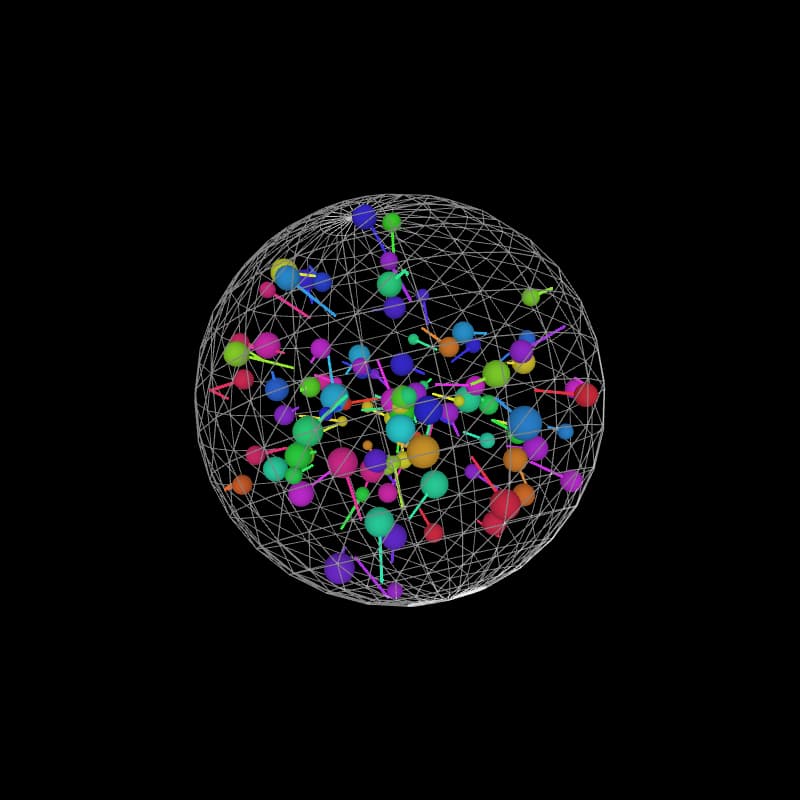
Here’s a snapshot of the simulation in action, showcasing the colorful balls, the wireframe sphere, and the mesmerizing trails:
If you want to try your own test, try it at this website, where you can input the code yourself – here

0 comments
No approved comments yet. You can start the conversation.
Leave a comment