
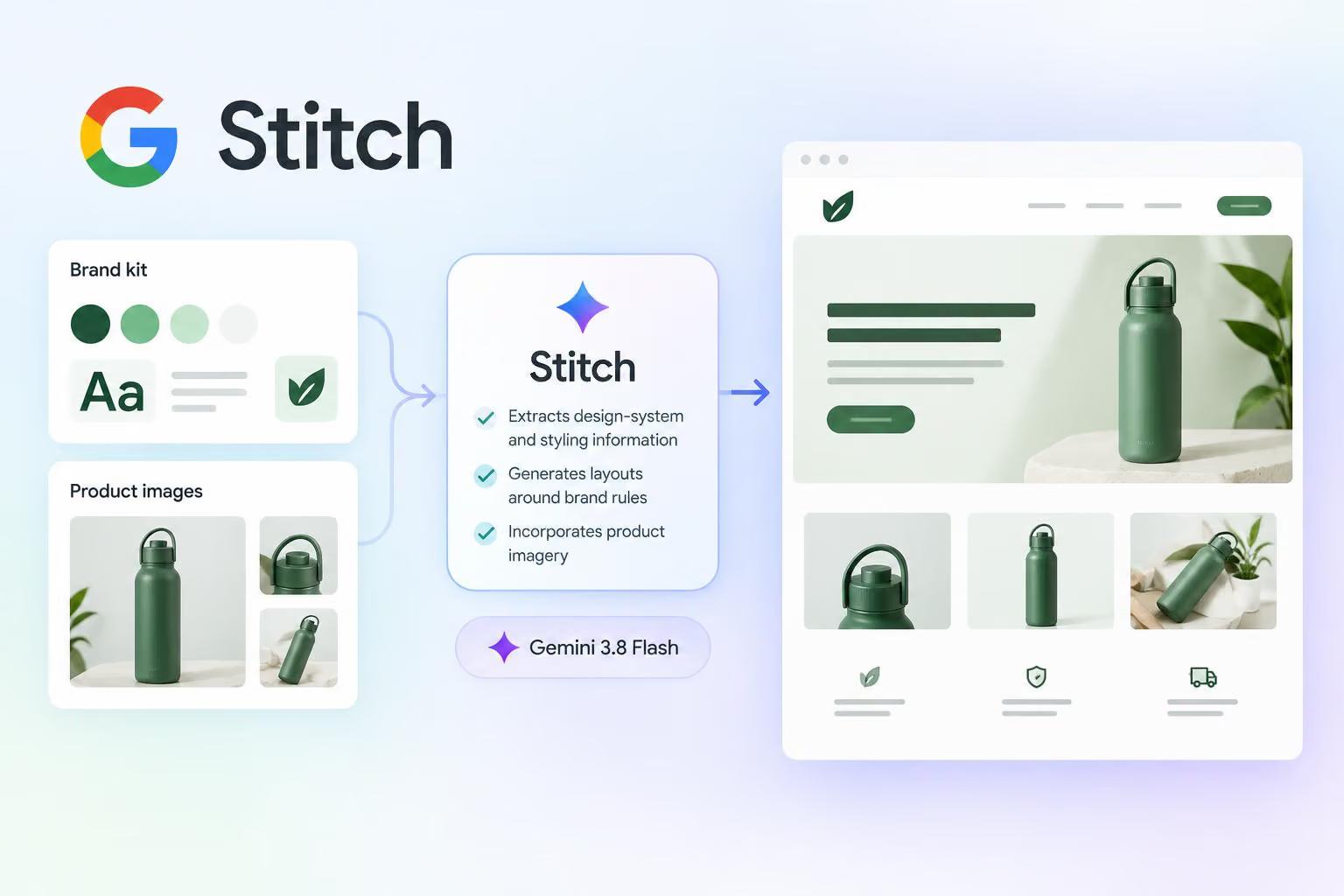
Stitch is being presented as a way to turn a brand kit and product images into marketing or product-page layouts. In a post on X, @stitchbygoogle says users can drag those assets into a Stitch prompt, after which the tool automatically extracts design-system and styling information, generates layouts around brand rules, and incorporates product imagery.
The announcement describes a proposed workflow rather than establishing how the resulting designs perform in practice. It does not specify whether the workflow is generally available, which assets it supports, or how much editing the generated designs require.
What Stitch’s reported brand-asset workflow does
A brand kit is a collection of visual materials and rules that helps a team keep its designs consistent. In the described workflow, users provide that kit along with product shots—the images of the products that need to appear in the final design.
Stitch is described as extracting design-system information—the reusable visual rules and components that help keep interfaces consistent—along with styling from those inputs. The announcement does not specify exactly what information Stitch extracts or how users need to prepare their files, so it presents the function at a high level rather than as a set of implementation instructions.
The post includes a 28-second video accompanying the workflow announcement.
From brand assets to guided layouts
The reported goal is to generate cohesive layouts that follow the supplied brand rules. That makes the brand kit more than a reference document in the described workflow: Stitch is presented as using the kit to guide the visual treatment of the layouts it creates.
The announcement names marketing pages and product pages as target outputs. It does not provide enough detail to establish which page structures are supported, and it does not describe export formats, editing controls, prompting requirements or limits on the number of assets.
Product imagery has a separate role in the workflow. The post says Stitch can weave product shots into the generated pages, indicating that the tool is intended to combine brand direction with the specific products a page needs to present. The announcement does not establish how accurately the system places or styles those images.
What Gemini 3.8 Flash is reported to do
The post describes Gemini 3.8 Flash as excelling at understanding visual context and connects that capability with the brand-asset workflow. In practical terms, the announcement associates the model with interpreting the visual information in a brand kit and product shots before Stitch generates layouts.
The exact role of Gemini 3.8 Flash in Stitch is not specified. The announcement does not describe the processing sequence or identify which parts of the workflow are handled by the model.
What the announcement does not establish
The source does not confirm Stitch’s availability, pricing, supported regions, upload requirements or whether the workflow is limited to a preview or particular users. It also does not specify supported file types, upload limits, export options or the amount of manual editing required after generation.
For teams evaluating AI-assisted brand and page design, the announcement describes a potentially useful sequence: provide brand assets and product imagery, have the system use that visual direction, and generate layouts for marketing or product pages. Whether that sequence is available in practice or produces usable designs requires product documentation and hands-on evaluation.


0 comments
No approved comments yet. You can start the conversation.
Leave a comment