
Ornith-1.5-122B is out as an open-weight reasoning model under the MIT license, with a 262,144-token context window and a model card that says it serves on a single 80GB GPU. In a post on X, @ornith_ describes it as a 122B mixture-of-experts model that reaches state-of-the-art results among open-source models of comparable size. The Hugging Face page lists 125B parameters in BF16 tensors; the "122B" in the name is the label Ornith uses.
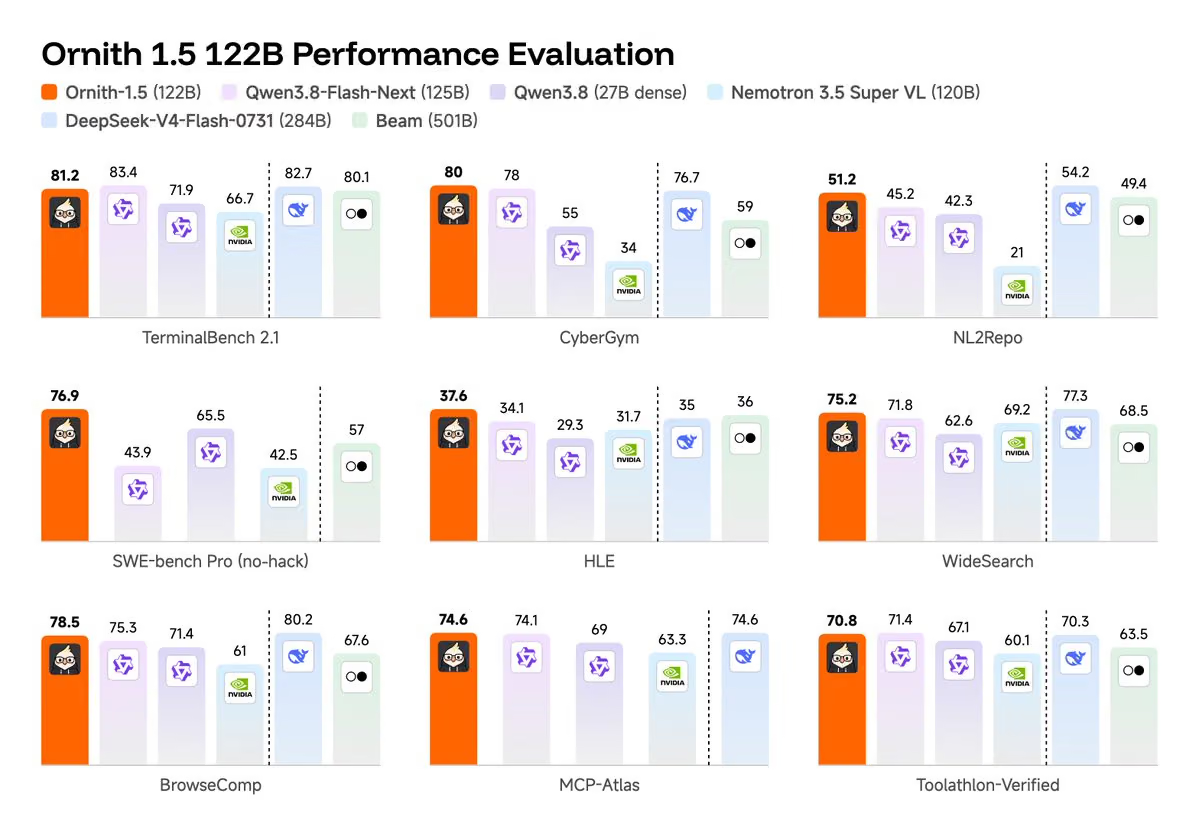
Image credit: @ornith_ on X
What's in the release
Ornith-1.5-122B is the newest member of the Ornith-1.5 family, which Ornith's launch write-up describes as spanning 397B MoE, 35B MoE and 9B dense models. That page does not mention a 122B, so this release extends the family. The model card calls it the most capable and efficient member of Ornith-1.5, designed for single-GPU deployment, and mentions a quantized Ornith-1.5-122B-Mobile variant for edge devices.
Per the card, the model:
is a reasoning model: the assistant turn opens with a
<think>block, and the serving recipes use a reasoning parser to return it in a separatereasoning_contentfield;emits tool calls that vLLM and SGLang surface as standard OpenAI-style
tool_calls;is described as optimized for terminal-based coding agents.
Ornith's launch write-up says its models are built on Qwen3.5 and Gemma 4 with continued pretraining, mid-training and post-training, and that Ornith-1.5 trains through a self-improvement loop in which the model proposes tasks, builds scaffolds and produces rollouts. That description covers the family; the 122B card does not restate it.
How to run it
The card says the model serves on a single 80GB GPU and gives recipes for an OpenAI-compatible server. Runtime minimums are Transformers 5.8.1, vLLM 0.19.1 or SGLang 0.5.9.
vllm serve ornith-ai/Ornith-1.5-122B --served-model-name Ornith-1.5-122B \
  --host 0.0.0.0 --port 8000 --max-model-len 262144 \
  --gpu-memory-utilization 0.90 --enable-prefix-caching \
  --enable-auto-tool-choice --tool-call-parser qwen3_xml \
  --reasoning-parser qwen3 --trust-remote-code
The SGLang recipe uses --tool-call-parser qwen3_coder and --reasoning-parser qwen3 with the same 262,144 context length. For a lighter route, the card lists ollama run ornith-1.5:122b and a llama.cpp command that loads a GGUF build from ornith-ai/Ornith-1.5-122B-GGUF. It also shows setup snippets for Hermes Agent, OpenClaw, OpenCode and Unsloth, all pointing an OpenAI-compatible client at a local endpoint.
Recommended sampling differs by task:
Task | Temperature | top_p | top_k | presence_penalty |
|---|---|---|---|---|
General | 1.0 | 0.95 | 20 | 1.5 |
Precise coding | 0.6 | 0.95 | 20 | 0.0 |
For inputs beyond 262,144 tokens, the card suggests YaRN RoPE scaling, which vLLM and SGLang support. A factor of 4.0 stretches the window to roughly 1M tokens. Because these runtimes apply the scaling statically to every request, the card warns it can slightly hurt quality on ordinary-length inputs, and advises sizing the factor to the longest requests you expect (factor 2.0 for about 524,288 tokens).
Our read on memory: the card's single-80GB-GPU claim sits close to the limit once weights are loaded. Check the file sizes of the build you plan to use against your card, and leave headroom for the KV cache, which grows with context length. For scale, 125B parameters at 2 bytes each in BF16 come to roughly 250GB by our arithmetic, so the single-GPU claim implies a quantised build. The card's intro repeats the post's wording that it "runs on a single DGX", while its serving section specifies a single 80GB GPU.
The Ornith-1.5 collection on Hugging Face lists three 125B text-generation entries for this release, alongside sub-collections named Ornith-1.5-MLX and Ornith-1.5-DFlash.
Benchmarks: where it leads and where it trails
All figures below come from Ornith's own model card and chart, not independent testing. The card's footnotes list the harnesses: Claude Code 2.1.126 with scores averaged over five runs for Terminal-Bench 2.1, OpenHands with anti-reward-hacking safeguards for the SWE-bench variants, and Claude 4.6 Opus and Claude 4.8 Opus as judges for HLE and MCP-Atlas.
Benchmark | Ornith-1.5-122B | Qwen3.8-Flash-Next (125B) | DeepSeek-V4-Flash-0731 (284B) |
|---|---|---|---|
SWE-bench Pro (no-hack) | 76.9 | 43.9 | – |
CyberGym | 80.0 | 78.0 | 76.7 |
NL2Repo | 51.2 | 45.2 | 54.2 |
TerminalBench 2.1 | 81.2 | 83.4 | 82.7 |
BrowseComp | 78.5 | 75.3 | 80.2 |
Toolathlon-Verified | 70.8 | 71.4 | 70.3 |
The card also reports 84.5 on SWE-bench Verified (no-hack), 76.4 on SWE-bench Multilingual, 75.2 on WideSearch, 74.6 on MCP-Atlas and 79.4 on ClawEval.
The biggest gap is SWE-bench Pro, where Ornith's 76.9 compares with 65.5 for Qwen3.8 27B dense and 43.9 for Qwen3.8-Flash-Next. DeepSeek-V4-Flash-0731 has no score in that row. Our read: "state of the art among comparable size" holds on some rows but not all. Ornith trails Qwen3.8-Flash-Next on TerminalBench 2.1 and Toolathlon-Verified. It also trails the 284B DeepSeek-V4-Flash-0731 on NL2Repo, BrowseComp, TerminalBench 2.1, WideSearch (75.2 vs 77.3) and HLE with tools (48.0 vs 50.8). For context on those rivals, see our coverage of Qwen3.8-Flash, DeepSeek V4 Flash 0731 and DeepSeek-V4.1-Flash-1017.
Numbers to double-check
The post lists HLE at 0.446, but the model card gives 37.68 without tools and 48.0 with tools, and the chart shows 37.6. The 44.6 figure matches the no-tools HLE score of the larger Ornith-1.5-397B in Ornith's launch write-up, so the post number looks like a mix-up. The post's Terminal-Bench 2.1 score of 0.813 also differs slightly from the card's 81.2. Use the model card's figures.
Availability
The weights are on Hugging Face under ornith-ai/Ornith-1.5-122B with an MIT license. Neither the card nor the post lists a hosted API or pricing for the model.
Who should care
Our view: if you want an MIT-licensed model for local coding agents, this is worth trying, especially through Ollama or a quantised GGUF on a single large GPU. Check your chosen build's memory use against your card before planning around one 80GB device, and wait for independent benchmark results before relying on the SWE-bench Pro lead. We will update this article as outside scores appear.



0 comments
No approved comments yet. You can start the conversation.
Leave a comment